Sunday, March 15, 2015

How to clip iTunes movies / videos and convert

There are all sorts of occasions you might wish to clip iTunes movies. Sometimes you may want to remove the boring opening scene about the film producers or advertising broadcast before the movie. And with the development of film and television, more and more types of titles, more and more involved in a wide range of areas. Sometimes the highlights may attract your attention to save it alone. Or you may want to keep the unique music and film credits eggs at the end.
In fact, it’s easy to clip the video. But the iTunes movies with DRM protection need to be authorized and can only be played on Apple devices. So it seems not easy to clip the DRM iTunes movies.
Maybe Kigo M4V Converter is just the helper you want to clip iTunes movies. It is a best DRM Removal and it is devoted to converting iTunes purchased videos including Movies, TV Shows and music videos. During the conversion, Kigo M4V Converter can help you clip the video with simple settings. You can also select chapter to clip the video. Here will show you how to get iTunes movies clips.
Step 1: Add iTunes movies
Click the Add Movies button and the iTunes movies you have purchased will show in the pop up window. You just need to select the movie you need to clip.

Step 2: Clip the video
Click the duration drop-down list and select Clip Video.
Then the Customize time window pops up. You can input the value to customize the Start or End time. After you click OK button to save the changes, the value will be displayed on the file.
Step 3: Start Conversion
Now you can press the Convert button to start converting iTunes movies with the default output format Same as source for mov. And Kigo M4V Converter can convert videos at 20X conversion speed.
With the Same as source for mov output format, the ac-3 surrounding audio tack and subtitles of original can be saved as source.
After converting is done, the converted file will be saved automatically in the history list. You can check the converted file in the history list. The file is without DRM protected and keeps the duration according to the clip settings. The extra segment has been removed from the movie.
Kigo M4V Converter supports a lot of output formats like MP4, MOV, AVI, WMV, 3GP, 3G2, FLV, MPG etc. So you can play the output files on other video players!
With the help of Kigo M4V Converter, you can choose the chapter and audio track as you like and happy to enjoy the movie.
Please visit the website to know more info about Kigo M4V Converter!

Monday, March 2, 2015

How to convert QuickTime video to MP3 with Kigo Video Converter

MOV is a QuickTime movie format, which is developed by Apple for storing frequently used digital media types. As we all know, MOV provides very high quality video clips, and it is one of the most popular formats in many websites for video streaming. 
It can be placed both on an Internet streaming server, as well as on local storages such as hard disk or CD ROM. MOV files can be played on both Mac OS and Windows using Apple QuickTime Player. 
If you have a lot of QuickTime MOV videos, and sometimes you want to extract the audio from the video for playback on iPod shuffle or some MP3 players on the go, what should you do?
Among so many video converters, when you don’t know which one to choose, the freeware must be your best choice. 
Here is a freeware Kigo Video Converter to recommend to you.
Kigo Video Converter supports converting all popular video formats including flv, MPEG1, MPEG2, MP4, 3GP, 3G2, MOV, AVI, M2TS, M4V, etc to play on iPod, iPhone, PSP, PS3, Apple TV, Zune, Creative Zen, Archos and so on. 
Kigo VideoConverter can also make your QuickTime video more special. You can clip the video, add video effects, crop the video, and even add watermark.
When you want to extract audio from QuickTime video, you can choose the popular MP3 as the output format. Here is how to convert QuickTime video to MP3 with Kigo Video Converter.
Step 1: Add QuickTime videos
Click the Add button to open the adding window, select QuickTime MOV videos and click the Open button to add.


Step 2: Set MP3 as the output format
Click Profile drop-down list to choose MP3 as the output format.
Step 3: Start converting
Click the Convert Now button and then the converting progress will show on the Pending- Converting list.
After converting is finished, KigoVideo Converter converts QuickTime video to MP3 with the perfect output quality and high conversion speed on the History- Converted list.
With Kigo Video Converter, you can convert videos without paying a penny. In addition, Kigo Video Converter is also a free web video downloader. You can download videos from YouTube, Dailymotion, Metacafe, Facebook, Dailymotion, Vevo, Howcast, liveleak, myvideo, nicovideo etc.
In a word, Kigo Video Converter is an all-in-one free video converter, free video editor, free website video downloader for Mac OS X users.
Know more about Kigo Video Converter, please visit website:

http://www.kigo-video-converter.com/free-video-converter-mac/

Wednesday, February 25, 2015

Howto convert Audiobooks to MP3 with chapters kept


Howto convert Audiobooks to MP3 with chapters kept
Howto keep chapters when converting Audiobooks to MP3, how to remove DRM from purchased Audiobooks from iTunes Store with Macsome Audiobook Converter
http://www.macsome.com/audio-book-converter-mac/index.html

Kigo Video Converter Tools: How to deinterlace video to use in Flash

Kigo Video Converter Tools: How to deinterlace video to use in Flash: When you use the interleaved videos like the broadcast format or media format to make flash, you must deinterlace the videos first. With Ki...

Sunday, February 8, 2015

All products of Kigo Video Converter Now 30% OFF

Kigo Video Converter Tools: All products of Kigo Video Converter Now 30% OFF: Valentine’s Day, the most romantic day of the year, is the special time of year to remind your loved ones how much you care. And at the sam...

Friday, February 6, 2015

How to play DVD movies on your iPad Air2

With Kigo Video Converter Ultimate, you can convert these DVD movies to the video format for iPad Air2, and then transfer them to your iPad Air2.

Steps to rip DVD movies for iPad Air2

1. Set the DVD Loader settings. If Kigo Video Converter Ultimate is ready, click the Kigo Video Converter Ultimate menu and select Preferences. Switch to DVDLoader tab in the pop-up window and check on the options “Entire DVD” and “High Speed Aggressive I/O”.

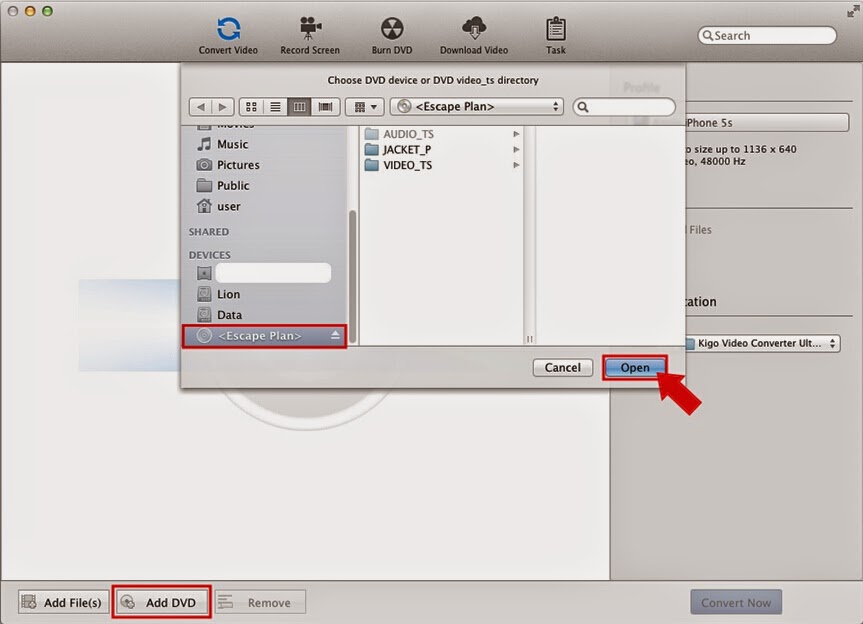
2. Insert a DVD and add the DVD file. Connect a DVD device and click the Add DVD button on the Convert Video list. Select the DVD file and click the Open button to add the entire DVD file to the list efficiently.


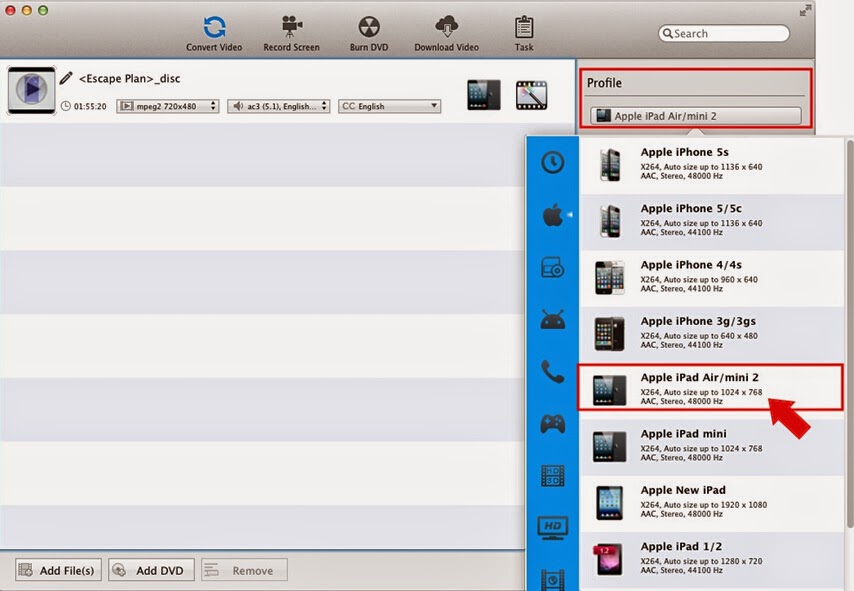
3. Set the output format. Click to unfold the Profile drop-down list and select Apple iPad Air/mini2 as the output format in the Apple Device category.

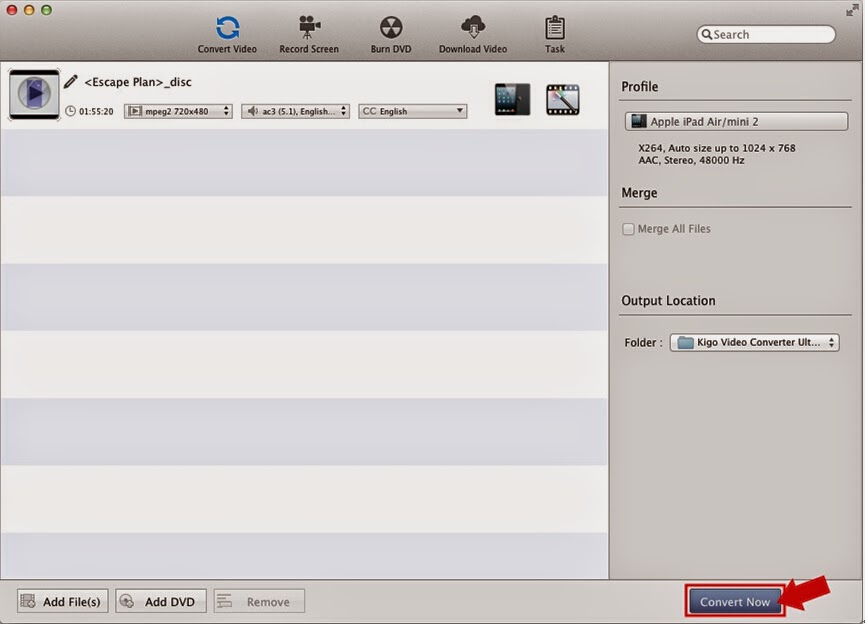
4. Start converting. Keep the default output path and click the Convert Now button to start converting. You can find the converting progress on the Task/Pending/Converting list. After the conversion, you can get the output file from Task/History/Converted list. And you can play the DVD file on your iPad.

Tips:
Kigo Video Converter Ultimate can also support video converting, web video downloading, screen recording, and DVD creating. Know more via http://www.kigo-video-converter.com/video-converter-ultimate-mac/index.html
You can drag DVD file directly to convert for different players.
Kigo Video Converter Ultimate supports AC3 pass through while converting DVD with AC3 (5.1) audio track.
Kigo Video Converter Ultimate supports 2-pass-encoding to get better video quality while converting.
Kigo Video Converter Ultimate enables deinterlace while converting interleaved video.
Kigo Video Converter Ultimate supports MP4 flat and hint.
The converted video files can be added to convert and upload to Youtube quickly.
Warnings:
When you stop the conversion in the pending list, the converting progress will be deleted from the list.

Thursday, February 5, 2015

Howto Convert Videos from AVI to MP4, 3GP to MP4, DVD to MP4


How to convert videos from iPhone6, iPhone 6Plus, iPad Air2, iPad Mini 2, How to convert videos for Sony PS3, Samsung Note, iRiver, Xbox, and so on, How to rip kinds of DVDs to MP4, AVI or other. http://www.kigo-video-converter.com/video-converter-pro-mac/index.html