Showing posts with label kigo m4v converter. Show all posts

Wednesday, October 28, 2015

Kigo M4V Converter for Mac Released Version 4.1.5 Update for Mac EI Capitan 10.11 Users

KVC Inc. has released the latest version of Kigo M4V Converter for Mac v4.1.5 on Oct 20, 2015.

The latest version of Kigo M4V Converter for Mac mainly aims at solving the problem that users can’t batch conversion successfully, as well as providing the registration information for registered users on Mac EI Caption.
Mac OS X EI Caption
Mac OS X EI Caption, Mac OS X 10.11
iTunes had updated to v12.3. This update to iTunes adds support for iOS 9 and is designed for OS X El Capitan. With this update, Improves Apple Music accessibility with VoiceOver, resolves a problem that prevented reordering of songs within Up Next and many other new features. You can download it to have a try.

Kigo M4V Converter users, for both Mac and Windows, don’t need to worry much about the incompatible issues. Kigo M4V Converter for Mac and Windows can compatible with the latest version of iTunes 12.3 perfectly.

Kigo M4V Converter for Mac Overview

Kigo M4V Converter for Mac is not only M4V Converter but also DRM Removal software. With it, you can remove DRM protection from iTunes movies, TV episodes and converting those M4V files to plain MP4, MOV, FLV, AVI and many other significant video formats. In this way, users can enjoy the converted iTunes videos on various portable devices, including iPhone 6s, Samsung Galaxy S6/S6 Edge, LG G, Nexus, Nokia Lumia, and other Android or Windows phones and tablets.
Mac 10.11
Kigo M4V Converter v4.1.5 can compatible with Mac 10.11
The main feature of Kigo M4V Converter for Mac as following.
  • Get rid of DRM protection from iTunes M4V movie Rentals and Purchases. 
  • Support converting DRM-ed M4V to MP4, MOV, AVI, WMV, FLV, etc. 
  • Directly convert M4V files to fit Apple devices, Android devices, game consoles, etc. 
  • Works at 30x faster conversion speed with 100% original quality. 
  • Compatible OS: Mac OS X 10.8, 10.9, 10.10 & 10.11.

    Tips: How to remove DRM and convert M4V videos with Kigo M4V Converter for Mac

    1. Download, install and launch the latest version of Kigo M4V Converter. You can find the simple and clear interface as below. 
    Interface of Kigo M4V Converter for Mac
    2. Click Add Movies button to import iTunes movies, TV episodes and music videos you want to convert. And then click Add button. 

    3. You can find Convert to profile drop-down list at the left bottom of the window. You can click the list to set the output format. 
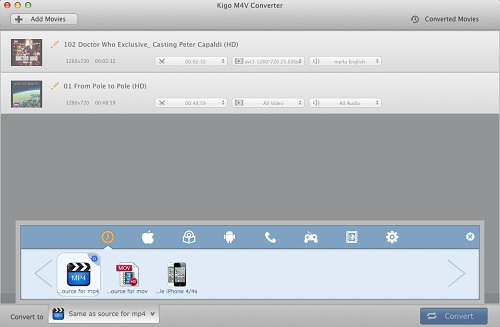

    4. After all settings done, you can click the Convert button to start the M4V files conversion.
SummaryKigo M4V Converter for Mac is really a simple, clear and green. It is a good choice for iTunes users who really want to convert iTunes movies, TV shows to a common format they can play anywhere. And this program sold at $39.95 with a free trial version. The price is much cheaper than similar products. For more info, view http://kigo-video-converter.com/m4v-converter-mac/index.html

Sunday, April 26, 2015

How to play iTunes protected M4V video files on Sandisk Sansa

 Summary: Kigo M4V Converter for Win enables you to play iTunes protected media files on Sandisk Sansa wherever you go.

The SanDisk Sansa is a line of 2 to 32 gigabyte flash memory-based portable media players produced by SanDisk. With expansive capacities and expandable memory, Sansa media players become the ideal choice for athletes, commuters, travelers, and other active audio enthusiasts.
The SanDisk Sansa can play various video formats such as AVI, WMV, MPEG-4, etc. But they do not support M4V video files rented or purchased from iTunes Store which protected by Apple DRM copyright. If you want to play iTunes M4V files on Sandisk Sansa, you need to decode your M4V files bofore transfer them into the application.
Kigo M4V Convert for Win is a safe video converter and professional DRM removal software. It can not only convert iTunes M4V files to MP4, AVI for Sandisk Sansa, also can remove DRM copy-protection from M4V files rented or purchased from iTunes Store. In addition, it compatible with Windows XP/ 7/ 8 or later.

Steps to convert iTunes M4V files to Sandisk Sansa
Now download and install the trial version of Kigo M4V Converter. Then follow the steps below to convert iTunes M4V files to Sandisk Sansa on Windows.
1.       Launch Kigo M4V Converter. Click “Add Movies” button and rifled through the M4V videos in the file search window. Find the files you want to convert and click the “OK” button.
2.       Click the “Profile” drop-down list, select the “Other Mobile phone/ Device” tab and choose “Sandisk Sansa Series” as the output format.

3.       Click “Convert” button to start converting the M4V files. The converted files are saved as the default storage location.
Transfer the Converted videos onto Your Sandisk Sansa
1.       Connect your Sansa players to the computer, via USB cable.
2.       Click “My computer” icon on desk. You will find your Sansa player listed as a portable hard drive. Double click it, find “Internal Memory” and open it.
3.       Now you can choose the converted video files and copy them to your internal memory.
4.       After all settings are completed, you can disconnect the Sansa.

Now you can enjoy your iTunes M4V files on your Sandisk Sansa wherever you go.