Monday, January 11, 2016

Kostenloses Multitalent rund um Videoformate

Kigo Video Converter wandelt Videos in unterschiedliche Formate um. Die kostenlose Software kennt sich mit zahlreichen Videocodecs aus und bietet vorgefertigte Umwandlungsprofile – etwa für mobile Endgeräte.
Kigo Video Converter funktioniert nach dem üblichen Videokonverter-Prinzip: Man wählt eine oder mehrere Filmdateien aus, stellt Ausgabeparameter ein und bestimmt ein Zielverzeichnis. Vor allem weniger erfahrenen Anwendern greift Kigo Video Converter mit vorgefertigten Profilen unter die Arme. Wer möchte, kann jedoch Hand an Ausgabequalität, Audioformat oder der Größe der Ausgabedatei anlegen.
Fazit
Kigo Video Converter macht eine durchgängig gute Figur. Ohne großen Aufwand bringt man mit dem Konverter Filme von einem Format in ein anderes. Dabei versteht sich die Software mit zahlreichen Codecs, was den Praxisnutzen steigert.
Kigo Video Converter unterstützt die folgenden Formate
AVI, WMV, MPG, MP4, FLV, 3GP, 3G2, MOV, M4V, MP3, AAC, RM, MKV, VOB
Vorteile
·         liefert angenehm flott Ergebnisse
·         zahlreiche vorgefertigte Profile
·         nützliche Vorschaufunktion
·         unterstützt zahlreiche Formate
Nachteile
·         keine Schnittwerkzeuge
·         es lassen sich keine Untertitel hinzufügen
·         auf Englisch

Know more information about Kigo Video Converter, go to view
On link to fast download the Free Video Converter:


Sunday, January 3, 2016

Five useful freeware to decorate your life for Windows users

Freeware to make a greeting photo card for New Year, Christmas, Halloween, Valentine Day, Father's Day, Easter, Grandparents Day, and so on. It provides with new card templates from time to time. You can add texts to the greeting card and reset the text as you like. More info you can go to http://photo-card-maker.com/index.html


Kigo Video Converter Free for Win is excellent video converter software which can convert video formats from one to another with perfect output quality and high conversion speed. It supports all popular video formats including FLV, MPEG1, MPEG2, MP4, 3GP, 3G2, MOV, AVI, M2TS, MPEG TS/TP (for HD Video), M4V, etc.


3. Free Audio Editor –Audacity
Audacity is a free, easy-to-use, multi-track audio editor and recorder for Windows, Mac OS X, GNU/Linux and other operating systems.

4. Free Video Downloader – Freemake Video Downloader
It supports downloading streaming videos easily from YouTube, Facebook, Vimeo, Dailymotion, LiveLeak, Flickr, Veoh, local and 10,000 sites and videos, playlists, channels in HD, MP4, MP3, AVI, 3GP, FLV, etc.

5. Free File Manager - Syncios Manager
Syncios Manager is free mobile manager to easily manage iPhone, iPad and iPod without iTunes, which offers you ultimate transfer solution between iPhone, iPad, iPod, Android devices and PC.

Monday, November 30, 2015

Get One Free One of KVC Special Sales for Black Friday

Thanksgiving Day is coming and black Friday is coming as well. KVC Inc also supports special sales that “Uses purchases Kigo Video Converter Ultimate, and can get the full version of Kigo M4V Converter for Free” from Nov 27 – Nov 30, 2015.
Kigo Video Converter Ultimate is an all-in-one Video Converter, DVD ripper, online video downloader, DVD creator, Screen Recorder.
It supports converting all popular video formats including FLV, MPEG1, MPEG2, MP4, 3GP, 3G2, MOV, AVI, M2TS, MPEG TS/TP (for HD Video) etc. And you can convert these videos for iPod, iPhone, iPhone 6S, iPhone 6S Plus, PSP, PS3, Apple TV, PSP, Zune, Creative Zen, Archos and so on with perfect output quality and high conversion speed for Mac OS X users.
Overview of Kigo M4V Converter
Kigo M4V Converter is used to convert any purchased movies from iTunes Store and convert these protected movies to MP4, AVI, FLV and so on for iPod, iPhone, PSP, iRiver, Sandisk Sansa, Samsung Tablet, Samsung Galaxy series phones, Kindle HD, iDVD and so on.
With Kigo M4V Converter, you can:
  • Convert DRM M4V videos on your iTunes
  • Remove DRM from protected movies, music videos and TV shows.
  • Extract MP3 / AAC audios from protected M4V videos
  • Batch convert videos at one time.

Now with the big deal and special sales, you can get M4V Converter for free. It is very affordable.
That is to say, when you purchases Video Converter Ultimate, you not only get the full function of video converting, multiple web video downloading, screen recording functions, and DVD Creating, you can also get the iTunes purchased movies converter, and make your movie enjoyment more freedom.
Don’t forget that: The special Sales “Get One Free One ” starts on Nov 27, 2015 and until Nov 30, 2015.

Wednesday, November 11, 2015

One Simple method to free download Break videos

This summary is not available. Please click here to view the post.

Free MP4 Converter on PC – Kigo Video Converter Free for Win Review

Kigo Video Converter is an all-in-one free MP4 / AVI / FLV and other general video converter for Windows users, which also supports simple user interface to help you convert any videos you want.
And then you can find the downloaded KigoVideoConverter.exe icon. 1
Double-click the icon.
2
click next- next –next, until you finish the installation, click “OK”.
3
After you install the software, it will open automatically
4
With the Free Video Converter, you can convert the next video formats including AVI, WMV, ASF, MOV, MP4, 3GP, M4V, QT, RM, RMVB, FLV, MKV, PMP, MPG, VOB, DAT and so on.
000
Before you start conversion, you can preview the videos with the built-in video player of Kigo Video Converter.
8
There are various video formats as output formats for you to choose, for example, you can convert videos to 3GP, MP4, DVD video NTSC Movie(.mpg), DVD Video PAL Movie (.mpg), MPEG-1 Movie, MPEG-2 Movie, AVI and so on. You can also convert video to MP3 format if you want.
6
If you don’t find the suitable video format for your player, you can reset the video / audio parameters as you like  
9      7
You can also set that shut down the computer after the conversion finished.
12
Even there aren’t output video presets for kinds of video player devices, but it supports most video formats as output, and you can find one for your device. Enjoy your videos.
System Requirements
  • Windows XP or Vista.
  • At least 512M physical RAM.
  • 1G Hz or above Intel processor.
  • At least one DVD-ROM.
  • 1024*768 resolution display or higher

Wednesday, October 28, 2015

How to rip DVD to MP4 quickly on Mac

If you have some DVD movies, you want to backup these DVDs, how to do?
If you rip these DVDs to MP4 format, there is no need to worry that you may break the DVDs and other accidents. Here tell you how to use Kigo VideoConverter Ultimate to rip DVD to MP4 format to backup your DVDs.
Step 1. Free download the latest version of Kigo Video Converter Ultimate, install and run it.
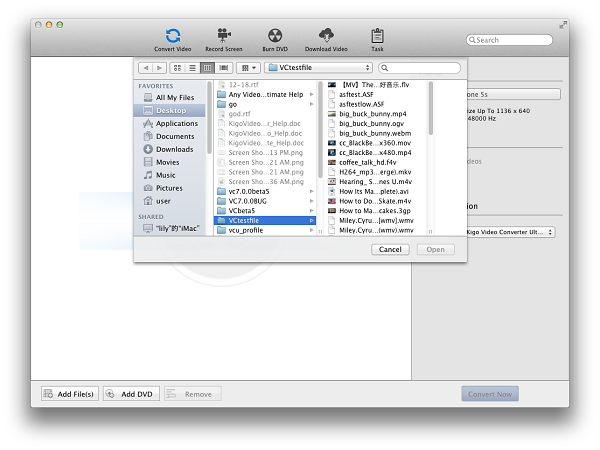
Step 2. Click the Add DVD button (Also through the menu item File-> Add DVD or drag files to the list directly from your disc or other location) to select the files you want to import.  

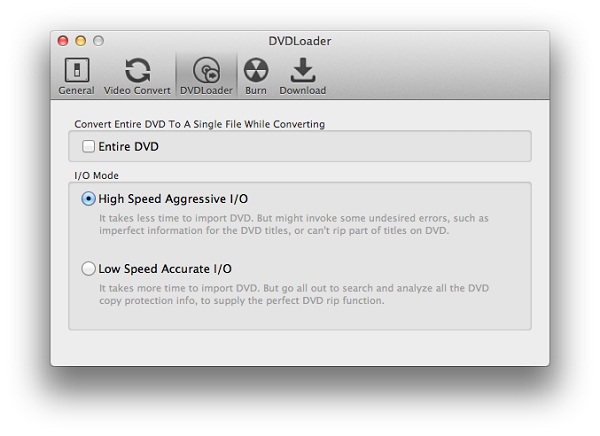
It provides 2 extraction modes so that you can import and convert the main DVD movie or import all titles to convert. You can choose the one which you like in the preferences settings. Open it through Menu->App name->Preferences:

Step 3. Choose MP4 as the output format in Profile drop-down list on the main interface.

Step 4. Click the Output Location- Folder drop-down list and then click Choose… to set the destination. And you can click the pen icon to rename the videos.
Click Edit effect icon to open the effect window and play video automatically in the Original Preview and Output Preview without any effects.
Step 5. Click the Convert Now button to start DVD ripping to MP4.
More details of Kigo Video Converter Ultimate online tutorials, you can view from http://kigo-video-converter.com/video-converter-ultimate-mac/tutorial.html


Kigo M4V Converter for Mac Released Version 4.1.5 Update for Mac EI Capitan 10.11 Users

KVC Inc. has released the latest version of Kigo M4V Converter for Mac v4.1.5 on Oct 20, 2015.

The latest version of Kigo M4V Converter for Mac mainly aims at solving the problem that users can’t batch conversion successfully, as well as providing the registration information for registered users on Mac EI Caption.
Mac OS X EI Caption
Mac OS X EI Caption, Mac OS X 10.11
iTunes had updated to v12.3. This update to iTunes adds support for iOS 9 and is designed for OS X El Capitan. With this update, Improves Apple Music accessibility with VoiceOver, resolves a problem that prevented reordering of songs within Up Next and many other new features. You can download it to have a try.

Kigo M4V Converter users, for both Mac and Windows, don’t need to worry much about the incompatible issues. Kigo M4V Converter for Mac and Windows can compatible with the latest version of iTunes 12.3 perfectly.

Kigo M4V Converter for Mac Overview

Kigo M4V Converter for Mac is not only M4V Converter but also DRM Removal software. With it, you can remove DRM protection from iTunes movies, TV episodes and converting those M4V files to plain MP4, MOV, FLV, AVI and many other significant video formats. In this way, users can enjoy the converted iTunes videos on various portable devices, including iPhone 6s, Samsung Galaxy S6/S6 Edge, LG G, Nexus, Nokia Lumia, and other Android or Windows phones and tablets.
Mac 10.11
Kigo M4V Converter v4.1.5 can compatible with Mac 10.11
The main feature of Kigo M4V Converter for Mac as following.
  • Get rid of DRM protection from iTunes M4V movie Rentals and Purchases. 
  • Support converting DRM-ed M4V to MP4, MOV, AVI, WMV, FLV, etc. 
  • Directly convert M4V files to fit Apple devices, Android devices, game consoles, etc. 
  • Works at 30x faster conversion speed with 100% original quality. 
  • Compatible OS: Mac OS X 10.8, 10.9, 10.10 & 10.11.

    Tips: How to remove DRM and convert M4V videos with Kigo M4V Converter for Mac

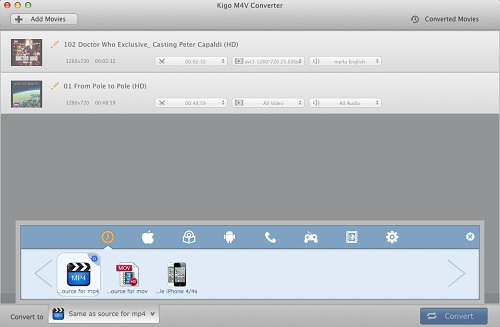
    1. Download, install and launch the latest version of Kigo M4V Converter. You can find the simple and clear interface as below. 
    Interface of Kigo M4V Converter for Mac
    2. Click Add Movies button to import iTunes movies, TV episodes and music videos you want to convert. And then click Add button. 

    3. You can find Convert to profile drop-down list at the left bottom of the window. You can click the list to set the output format. 


    4. After all settings done, you can click the Convert button to start the M4V files conversion.
SummaryKigo M4V Converter for Mac is really a simple, clear and green. It is a good choice for iTunes users who really want to convert iTunes movies, TV shows to a common format they can play anywhere. And this program sold at $39.95 with a free trial version. The price is much cheaper than similar products. For more info, view http://kigo-video-converter.com/m4v-converter-mac/index.html